ocelkit
A TypeScript toolkit for mapping the processes in your software. My bachelor’s thesis project.
Visit ocelkit
See the landing page, then read the docs.
ocelkit maps how work runs through your software.
Your software runs processes all day: an order is placed, confirmed, packed and paid. ocelkit draws that as a map from the records your software already keeps, so you can see how the work really moves and where it takes a turn you didn’t expect. It’s my bachelor’s thesis. I designed and built all of it: the toolkit, the workspace, the landing page, and the docs.
A process is a short TypeScript file.
A process file names the steps you care about and the order you expect them in. It’s plain TypeScript that sits next to your code, and the map is drawn from it.
import { defineProcess } from 'ocelkit'

// What happens once an order is placed?
export default defineProcess({
  name: 'Orders and items',
  activities: {
    placeOrder: 'place order',
    confirmOrder: 'confirm order',
    paymentReminder: 'payment reminder',
    payOrder: 'pay order',
    pickItem: 'pick item',
    createPackage: 'create package',
  },
  flows: {
    orders: [
      ['placeOrder', 'confirmOrder'],
      ['placeOrder', 'payOrder'],
      ['confirmOrder', 'payOrder'],
      ['confirmOrder', 'paymentReminder'],
      ['paymentReminder', 'payOrder'],
    ],
    items: [
      ['placeOrder', 'pickItem'],
      ['placeOrder', 'createPackage'],
      ['pickItem', 'createPackage'],
    ],
  },
})
Everything on the map is a box, a line or a number.
The map has three kinds of marks. This guide is from the docs: pick one and the picture moves to it.
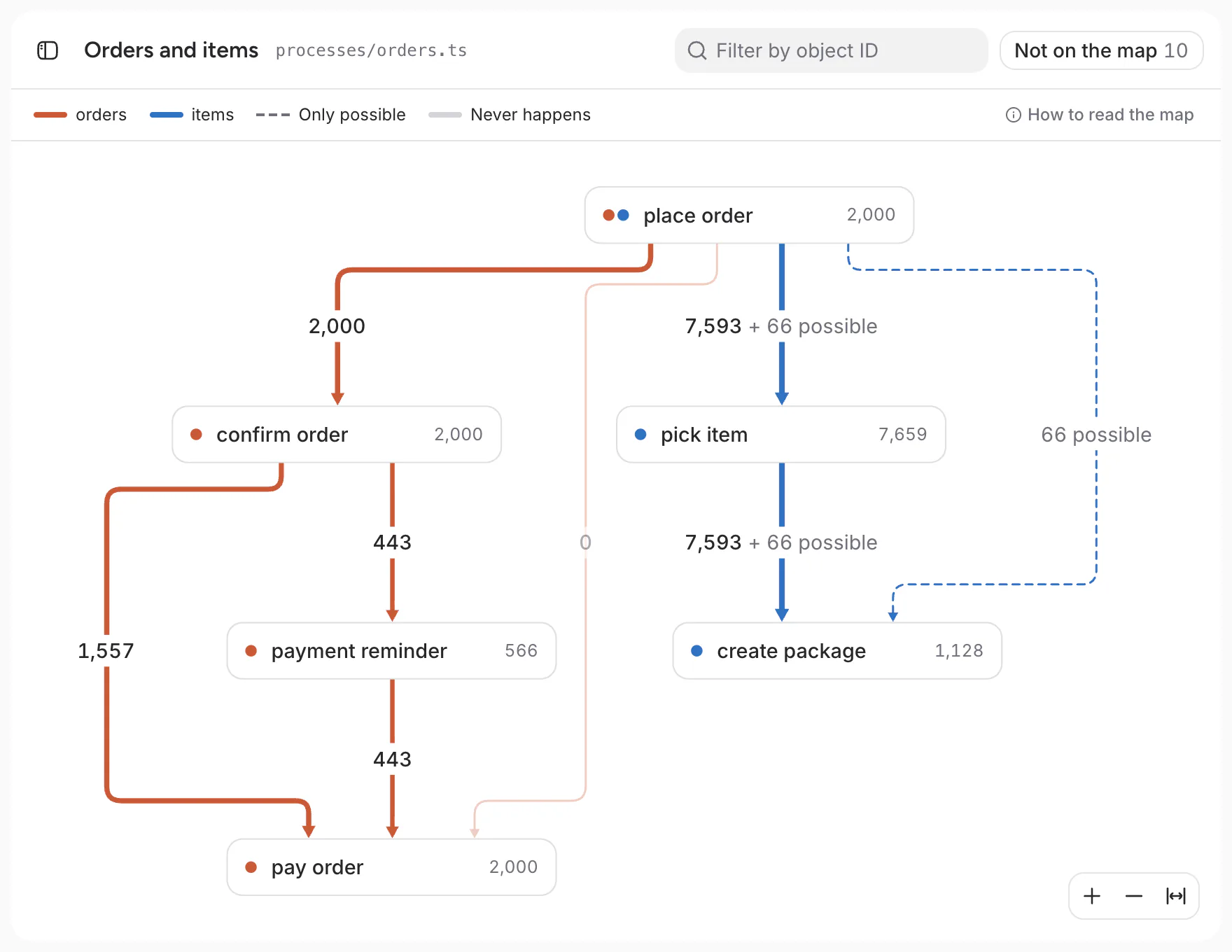
Every number opens the data behind it.
Every number on the map is a button. Click one and it lists the objects it counted, and every row opens that object.
Follow one object from start to end.
Any object can be followed on its own. Its path turns thick on the map, and the panel replays its history one event at a time.
See what your file leaves out.
The map only draws what the file lists. Everything else that happened in the data sits in one panel, so nothing is hidden.
For you and your agents.
An agent’s work has to be checkable. The check compares every name in a process file with the data, so a step the agent made up is an error, with the closest real name beside it. And the file is the state. It stays in the repository, where you or the next agent can pick it up.

$ ocelkit check
processes/deliveries.ts
  error  activities.delivered  "package deliverd" is not an event type in the data. Closest: "package delivered".
  error  flows.package         "package" is not an object type in the data. Closest: "packages".

processes/payments.ts
  no problems
2 errors, 0 warnings
Before the map, an agent rebuilds what happened.
The map needs a record of events, and most software doesn’t keep one. The pieces are spread across the app’s code, its database and schema, its logs, and the other systems it works with, so a coding agent puts them together. To see how far that can be trusted, I replayed real work through a real system, kept what happened away from the agent, and checked its record against it.
Then I wrote the skill.
I watched how the agents worked and wrote a short skill for the job from what I saw. With it, they hand back a cleaner file and test it themselves before they report.
The docs took the longest.
Understanding something, explaining it to someone, and writing it down for someone when you’re not there are three very different things. I designed and wrote the documentation to build up one idea at a time, with maps drawn from the real example data and diagrams you can step through.
Diagrams you can step through.
Some ideas only make sense one move at a time. Press Next and a small blob of light stretches out of one box and melts into the next, so you can follow how the events of an order and its items become the numbers on a line.
Light and dark.
Both themes are designed, from the tiles in the hero to every screenshot in the docs. Press the tiles and they ripple.